All your mail and messages, governed by an agent

Runs locally on your Mac. Sorts it, files it, drafts the reply. Nothing sends until you press send, or create an actionable from it through MCP.
GitHub
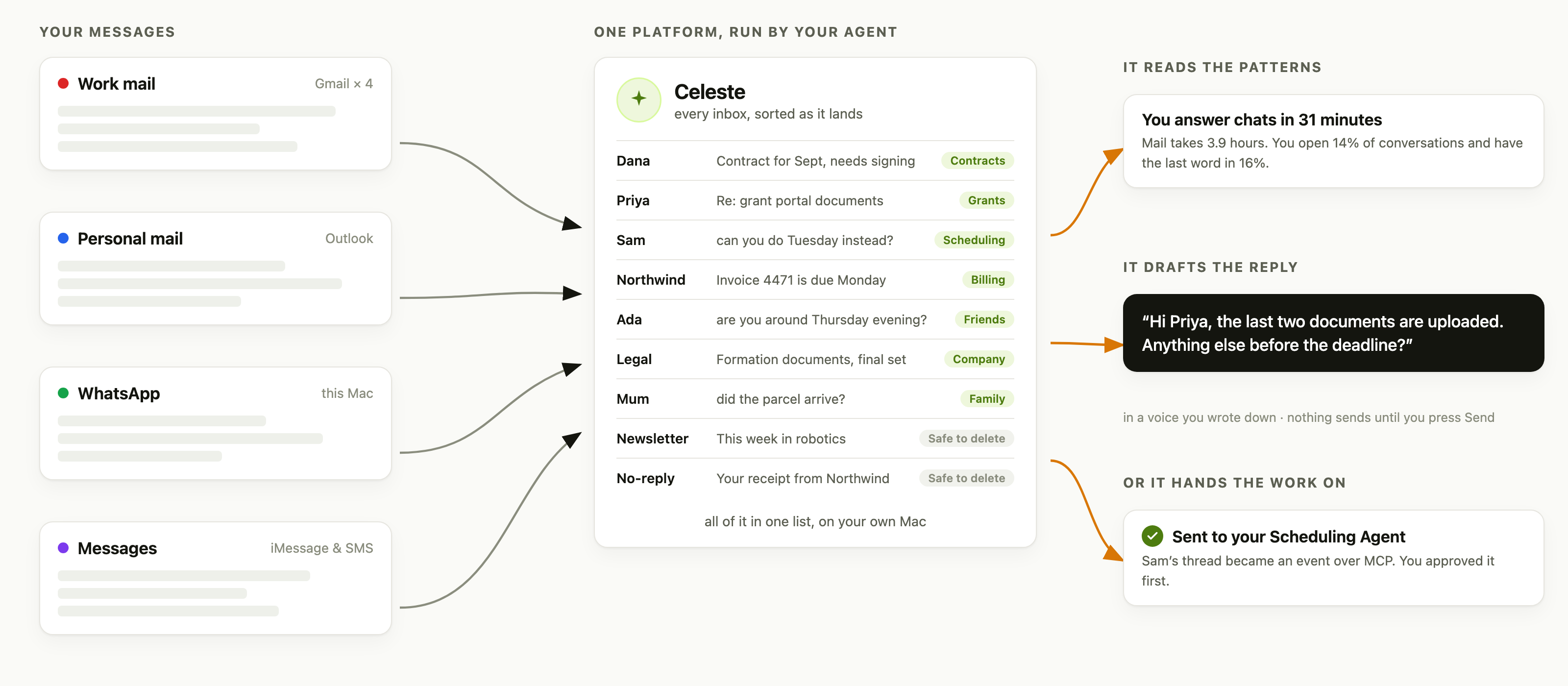
Four sources on the left, Work mail across four Gmail accounts, Personal mail on Outlook, WhatsApp and Messages, all feeding one list in the middle where every message carries the project it was filed under. On the right, the three things that follow: your messaging patterns read back to you, a drafted reply in your own voice, and a thread handed to the Scheduling Agent.
Syncs5 sources
Sortslocal model
Filesyour projects
Draftsyour voice
You sendalways
Inbox › Need to reply · Today
work.example.com Grant reporting, two questions before Friday 9:12Needs a replyClients
example.com Invoice 09/13 is due Monday 10:30Money
WhatsApp Ada Lovelace 10:34Needs a replyPersonal
example.com Your receipt from Northwind 11:02Safe to delete
Celeste draft
Hi Dana, both are on the way, signed W‑9 and the certificate, before Friday.

Hunter
Send Edit Nothing is sent until you send it.

Features

Sorts

Important? Needs a reply? Safe to delete? Runs free on a local model

Files

Describe a project in one sentence. Embeddings do the rest, on your Mac

Drafts

In a voice you write down. You edit it, or say what to change

Reads chats

iMessage and WhatsApp, in the same triage as mail

Answers

Searches every inbox and chat, with citations you can check

Schedules

A thread becomes an actionable or an event in your Scheduling Agent, over MCP

Stats

Analyze your messaging behavior

Demo

On a phone, drag a picture sideways, or tap it to open it full size

It sorts, and says why

A verdict on every message, with the sentence behind it

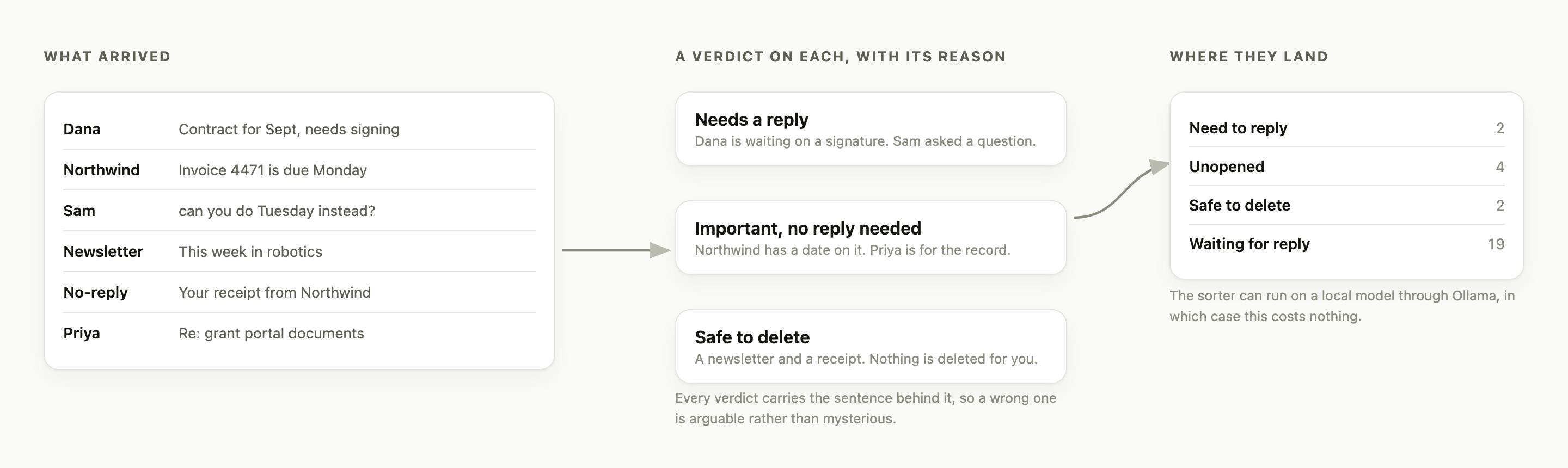
What arrived on the left, six messages with no verdict. In the middle, three verdicts with the reason behind each: needs a reply because Dana is waiting on a signature, important but no reply needed because the invoice has a date on it, safe to delete for a newsletter and a receipt. On the right, the folder counts they land in.

It files, from one sentence

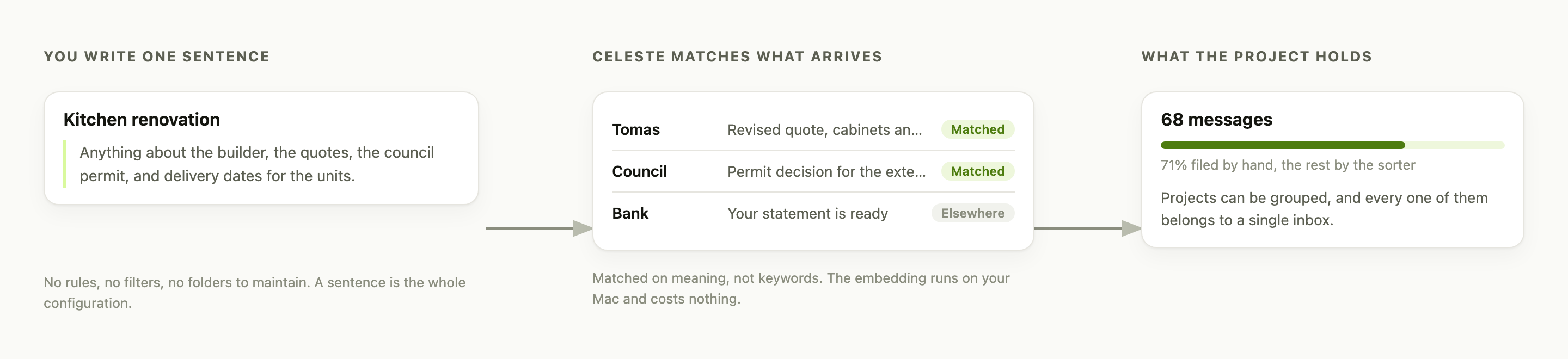
Describe a project in plain words. Matching is on meaning, and runs on your Mac

On the left, a project called Kitchen renovation described in one sentence. In the middle, three arriving messages, two matched to it and one sent elsewhere. On the right, what the project holds: 68 messages, 71 per cent filed by hand.

It drafts, and waits for you

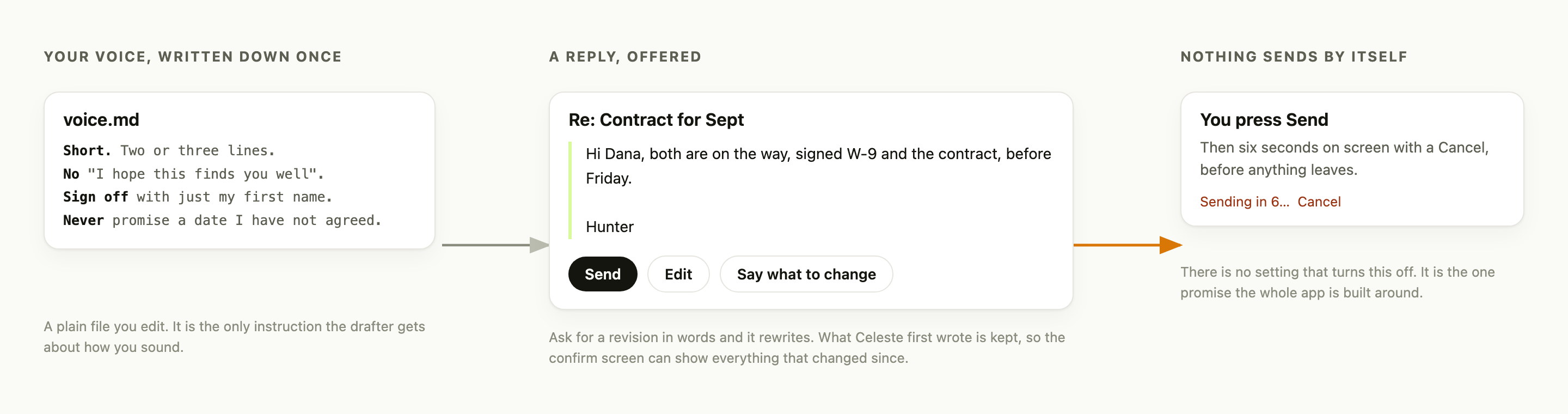
In a voice you wrote down. Six seconds with a Cancel before anything leaves

On the left, a voice.md file with four plain rules about how you write. In the middle, the reply Celeste offers, with Send, Edit, and Say what to change. On the right, what happens after you press Send: six seconds on screen with a Cancel before anything leaves.

It answers, with receipts

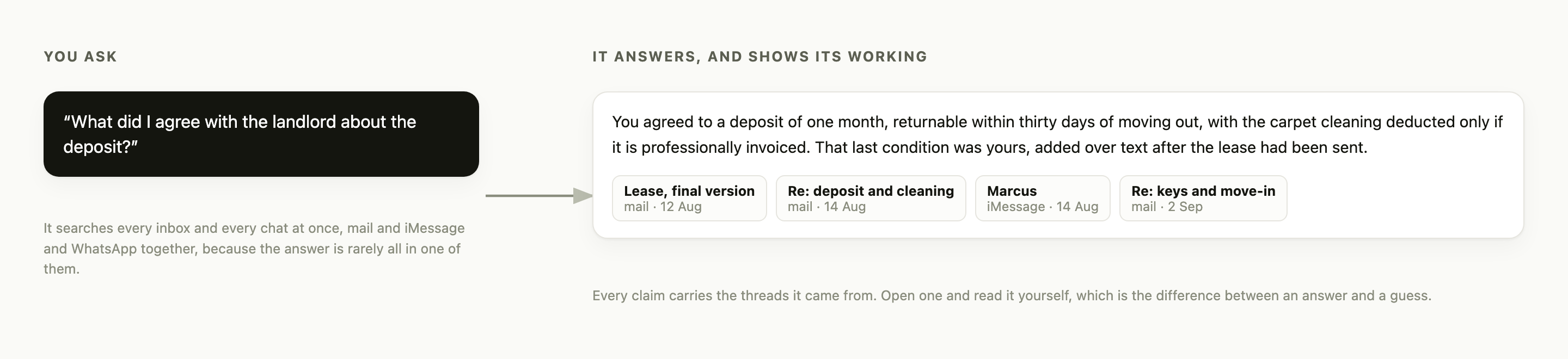
One question across every inbox and chat, and the threads it came from

On the left, a question about what was agreed with a landlord over a deposit. On the right, the answer, with four citation chips underneath naming the threads it came from across mail and iMessage.

It reads your own habits back

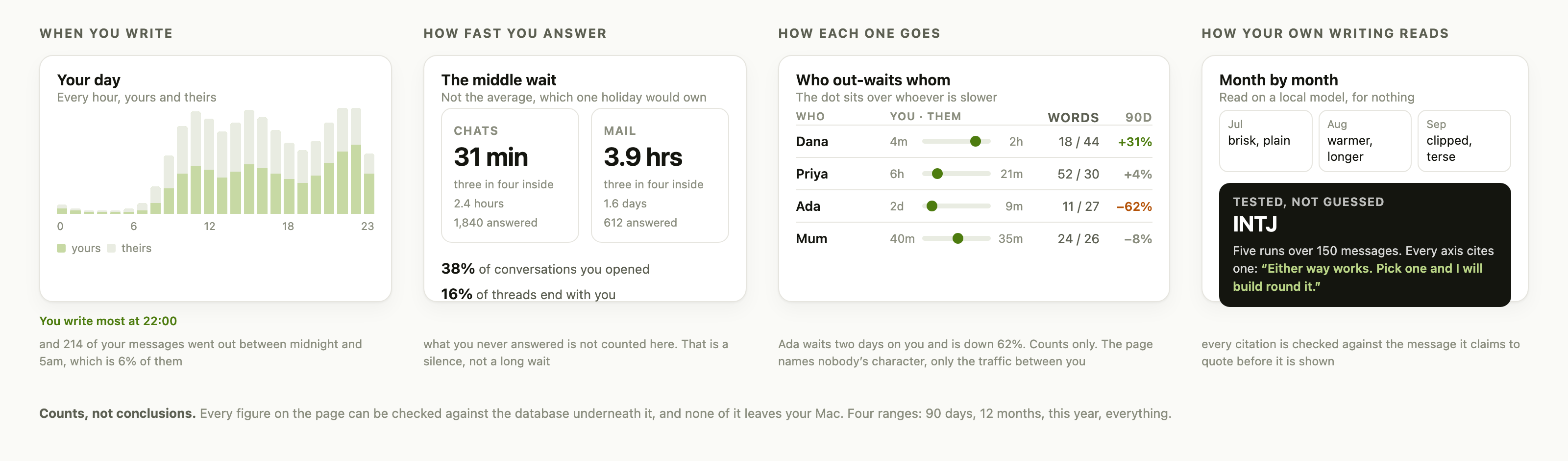
When you write, how fast you answer, who you keep waiting. Counts you can check, not advice

Four panels. On the left, a bar for every hour of the day, what you sent against what arrived, peaking at 22:00. Then the middle reply wait, 31 minutes on chats and 3.9 hours on mail, with the share of conversations you opened and the threads that end with you. Then four people with a track showing who out-waits whom, how many words each writes, and whether the last 90 days are up or down. On the right, your own writing read back month by month, and a personality type tested over five runs with the message each axis cites.

Handover

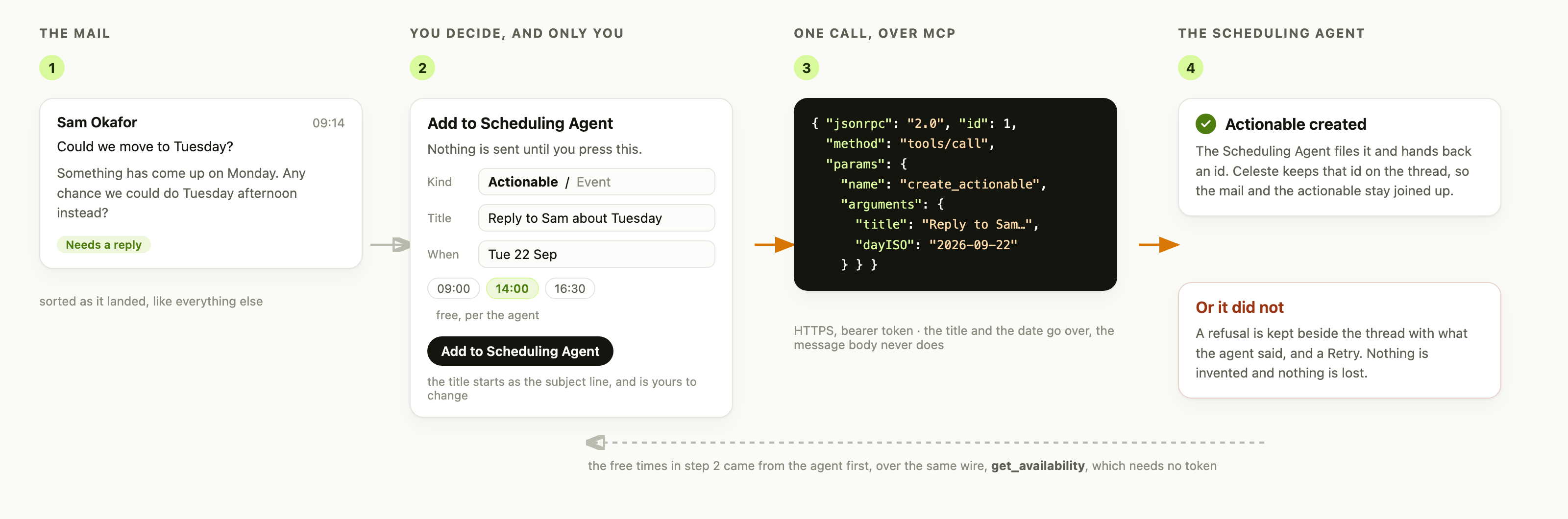
Four steps. One: a mail asking to move a meeting, already sorted as needing a reply. Two: the Add to Scheduling Agent form, where you pick actionable or event, edit the title, choose a day and pick from free times fetched from the agent. Three: the JSON-RPC call that goes out, naming the create_actionable tool. Four: the actionable comes back with an id kept on the thread, and beneath it the failure case, where a refusal is kept with what the agent said and a Retry.

Privacy

Never leaves your Mac
  • Mail & chats
  • Attachments
  • Embeddings
  • Search index
  • Drafts
  • Your voice file
Only the model calls you make Sorting can be local and free

Architecture

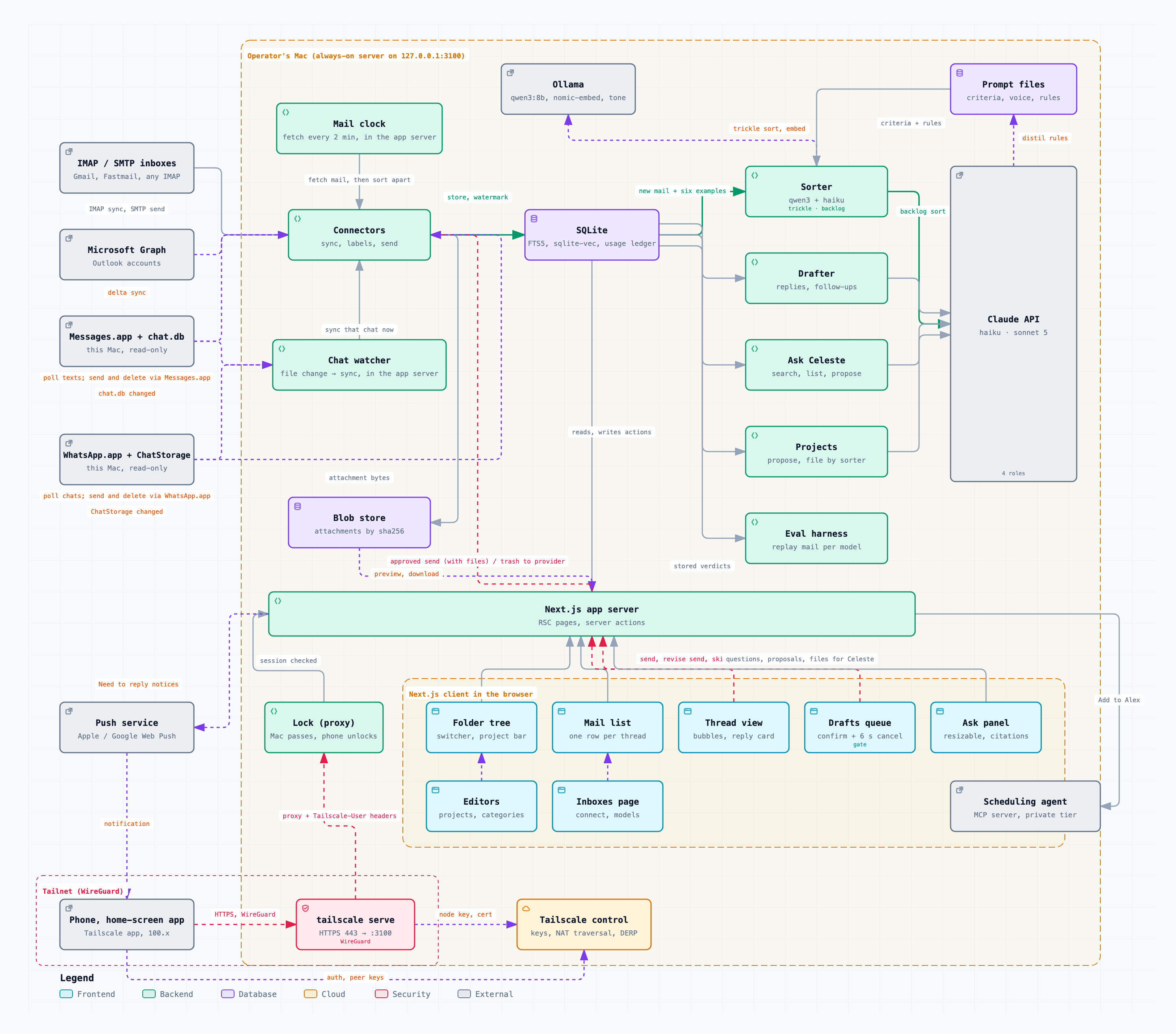
Mail and chat accounts sync into a single SQLite database on your own Mac. Sorting, drafting, project filing and search all read from that database, using either a local Ollama model or the Claude API. The web app serves your browser on loopback, and your phone over a private Tailscale network.

Why

“Nearly ten inboxes, and the ones that mattered were never on top.”

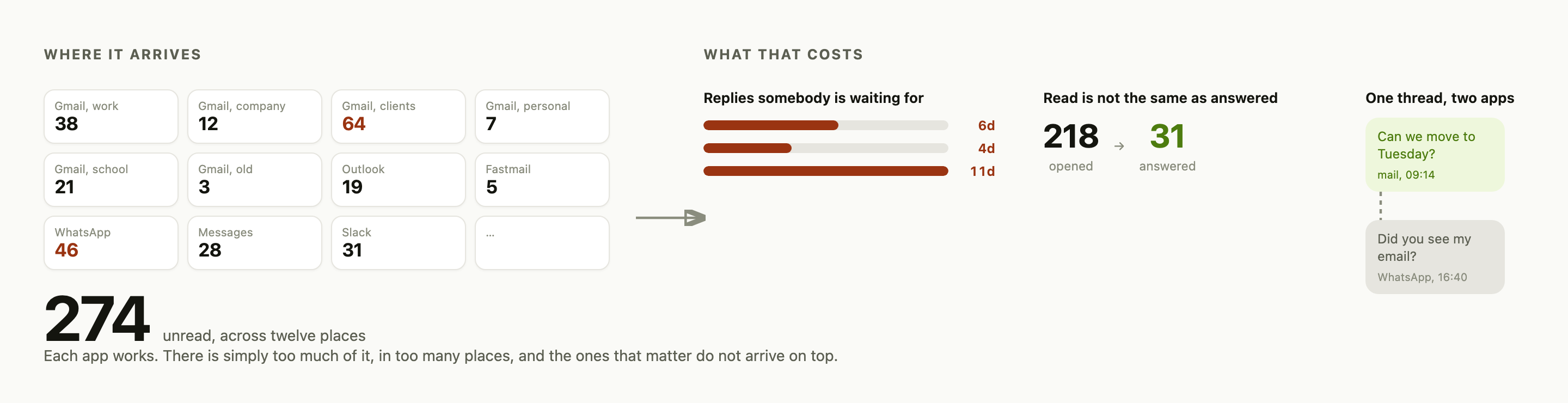
Twelve tiles on the left, one per inbox or chat app, with unread counts, and 274 unread in total across twelve places. On the right, three measures of what that costs: replies owed for six, four and eleven days, shown as bars; 218 messages opened against 31 answered; and one conversation appearing twice, once in mail and once in WhatsApp.

Hunter Zhang, who built it for himself · github.com/hunterZh37

Install

  1. pnpm install
  2. Copy .env.example to .env
  3. ollama pull nomic-embed-text
  4. pnpm web, then connect an inbox

macOS, Node 22+, pnpm. Background service and phone access are in the README